On-demand COF purchase
Overview
On-demand COF purchase is a payment type which uses a single initial request to make one (recurring) transfer of funds from customer to merchant by using previously stored payment credentials without validation of the payment instrument (such as card validation code).
The payment platform performs on-demand COF purchase as described in On-demand COF purchase: workflow and statuses.
The payment workflow
To create COF purchase:
- Register COF purchase. For more information, see Registering COF purchase.
- Submit a request for COF purchase with ID of debiting series record.
- Accept On-demand COF purchase: workflow and statuses from the payment platform.
For each subsequent debiting, you need to resubmit request for COF purchase and accept the callback with the debiting result.
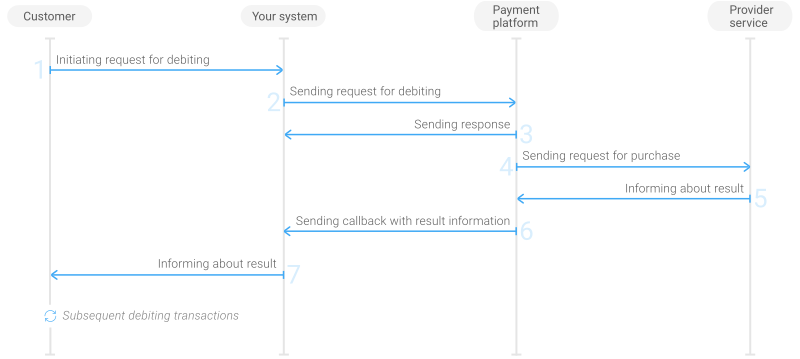
- The customer initiates debiting in your system.
- Your system sends the request for debiting to the payment platform.
- The payment platform sends you a response in which it acknowledges your request and provides the request validation result.
- The payment platform sends the request for the purchase to the provider service.
- The provider service informs the payment platform about the purchase result.
- The payment platform sends the callback with the payment result to your system.
- Your system sends the payment result to the customer.
- From then on, customer can initiate subsequent debitings that follow steps 1—7.
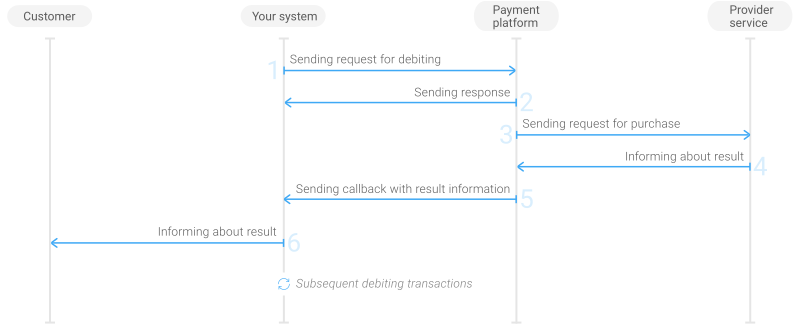
- Your system sends the request for debiting to the payment platform.
- The payment platform sends you a response in which it acknowledges your request and provides the request validation result.
- The payment platform sends the request for purchase to the provider service.
- The provider service informs the payment platform about the purchase result.
- The payment platform sends the callback with the payment result to your system.
- Your system sends the payment result to the customer.
- From then on, your system can initiate subsequent debitings that follow steps 1—6.
The sections that follow discuss formats for requests and callbacks; for general information about using the API, see Integration procedure.
Request format
This section describes format of the requests for COF purchases with on-demand debiting using payment cards. There are several things you must consider when submitting such requests:
- You need to use a POST request to one of the following endpoints: /v2/payment/card/recurring or /v2/payment/card/sale. You use the latter, if the payment credentials are stored in the web service and you use autopurchase or regular purchase.
- Your request must contain the following parameters and objects:
general—object with general request identification information:project_id—project ID obtained from PSPHostpayment_id—payment ID, must be unique within the projectsignature—signature created after you specify all the required parameters (For more information about signing requests, see Signature generation and verification.)
customer—object with customer information:ip_address—IP addressid—the ID of the customer within the merchant project
payment—object with payment information:amount—payment amount in minor currency units without any decimal point or comma except for cases where the currency does not have any minor currency units. If the currency has no minor units (that is, the number of digits for minor currency units is zero), then you must set this parameter to the amount in the major currency units. For the information on whether the currency has any minor units, see Currency codes.currency—payment currency according to ISO-4217 alpha-3
- Depending on the endpoint, you must add the following objects and parameters in the request:
- The
idparameter of therecurringobject inside the request to the /v2/payment/card/recurring endpoint must contain ID of debit series record previously received in the callback with registration information. - The requests to the /v2/payment/card/sale endpoint must contain the
cardobject with the following parameters:pan—card numberyear—card expiration yearmonth—card expiration monthcard_holder—card holder name (as specified on the card)stored_card_type—purchase type (4for autopurchase or6for regular purchase).
- The
- Additionally, you can use any other parameters as indicated in the specification.
Thus, a complete request must contain project ID, payment ID, signature, customer IP, payment amount and currency and either of the following: ID of debit series record or payment card credentials and COF purchase type.
Depending on the specific characteristics of providers involved in payment processing, the set of required parameters can vary. For the detailed information about the providers' requirements, contact the PSPHost key account manager.
{
  "general":{
    "project_id":42,
    "payment_id":"456789",
    "signature":"v7KNMp5D/aZAeb0VMdeR+CqGSm...=="
  },
  "customer":{
    "ip_address":"202.144.196.0",
    "id":"customer_12"
  },
  "payment":{
    "amount":400,
    "currency":"USD"
  },
  "recurring":{
    "id":1079    // ID of debit series record
  }
}
{
  "general":{
    "project_id":42,
    "payment_id":"456789",
    "signature":"v7KftZ5D/aZAdeR+qGrNxY...=="
  },
  "customer":{
    "ip_address":"202.144.196.0",
    "id":"customer_12"
  },
  "payment":{
    "amount":400,
    "currency":"USD"
  },
  "card": {
    "pan": "4242424242424243",
    "year": 2025,
    "month": 8,
    "card_holder": "JOHN SMITH",
    "stored_card_type": 4    // Automatic debiting
  }
}
Callback format
The payment platform includes the COF purchase registration information in its callback to your web service. The payment platform uses the standard format for callbacks. For more information, see Callbacks in Gate.
The following callback contains information about debiting 4,00 USD to card 424242******4243 of the customer with ID customer_12 within the 42 project.
{
  "project_id":42,
  "payment":{
    "id":"456789",
    "type":"recurring",
    "status":"success",
    "date":"2019-09-04T12:57:57+0000",
    "method":"card",
    "sum":{
      "amount":400,
      "currency":"USD"
    },
    "description":""
  },
  "account":{
    "number":"424242******4243",
    "type":"visa",
    "card_holder":"JUDY DOE",
    "id":45678,
    "expiry_month":"08",
    "expiry_year":"2025"
  },
  "recurring":{
    "id":1079,
    "currency":"USD",
    "valid_thru":"2022-10-31T00:00:00+0000"
  },
  "operation":{
    "id":39690002636,
    "type":"recurring",
    "status":"success",
    "date":"2019-09-04T12:57:57+0000",
    "created_date":"2019-09-04T12:57:53+0000",
    "request_id":"0b9f9e57a50-61da119c",
    "sum_initial":{
      "amount":400,
      "currency":"USD"
    },
    "sum_converted":{
      "amount":400,
      "currency":"USD"
    },
    "provider":{
      "id":414,
      "payment_id":"0020000000072964",
      "date":"2019-09-04T12:58:03+0000",
      "auth_code":"634R",
      "endpoint_id":414
    },
    "code":"0",
    "message":"Success"
  },
  "signature":"MpfogAxZ5D/b0VMdeR+xYyilUwSm...=="
}